Posts

Showing posts with the label SharePoint 2013

Create a dynamic and more user self service Web Portal

Image
I have been worked on a CMS Portal project in SharePoint 2013 platform and needed to create a lots of forms and landing pages. The stake holder needed to review and change frequently of the heading, messages, and column headers on the application pages, and so I am thinking to separate the labeling / contents from the code which the similar approach as Sitecore to save and retrieve word values in model's fields and then loading them to front-end pages. SharePoint provides some features to achieve showing dynamic contents as below methods: 1. Using SharePoint List I used a SharePoint list to save Label and message text values and then loading them dynamically in SharePoint WebParts. The benefit of this approach is giving user to update label/contents more easier without updating the source code. It increases the work efficiency. In some case, there will be multiple site collection needs to share data from the same SharePoint list. This causes cross domain call issue in jQu...

Fixed "String was not recognized as a valid DateTime" error in SharePoint 2013 when date is valid

I met the issue "String was not recognised as a valid DateTime" when I executed the code which using " DateTime.Parse(strdate)" to convert the string value with date format "01/03/2016" (Australian date format) in a SharePoint 2013 site.  The code is executed successfully in another SharePoint environment, and so I verify the "Regional settings" in this SharePoint site, and found out the "Time zone" settings is correct which set to "Sydney" time zone and the "Locale" settings was set to "English (United States)" which is incorrect, and so I change the "Locale" settings to "English (Australia)". I refresh the WebPart Page again, and the issue was gone!

SharePoint 2013 error - "Application error when access /_vti_bin/client.svc"

I had been received a error message " Application error when access /_vti_bin/client.svc, Error=Path '/_vti_bin/client.svc/ProcessQuery' is forbidden " when try to add user account to a user group in SharePoint 2013 Portal . I searched the issue in google and found out it may related to security issue in local folder  "C:\Program Files\Common Files\Microsoft Shared\Web Server Extensions\15\ISAPI" of " /_vti_bin/client.svc ". I verified the user permission on this folder and found out that "IUSR" for IIS is not there, and so I granted user account "IUSR" read and execute permission in this folder. I went back to try add user account in SharePoint again, and it worked successfully this time! This issue is related to error "The server was unable to save the form at this time. Please try again." which can be resolved using above configuration. In addition, if this error still occur, check the windows features in con...

Fixed "String was not recognized as a valid DateTime." issue in SharePoint 2013

Image
I met the issue "String was not recognized as a valid DateTime." in a WebPart in SharePoint 2013 site. The issue was occur in a line of code: DateTime.Parse(dr["DUE_DATE"].ToString());   The code works fine in production environment and I verified the date format for "dr["DUE_DATE"].ToString()" was "10/03/2016" (Australian Date format).  I went to "Site settings"-> "Regional settings" and then changed the "Locale" drop down list to "English (Australia)" as below screenshot. Now the issue is gone and the Date time value is showing in the WebPart! 

Calling a external web service in a SharePoint 2013 WebPart

I need to call a external web service in SharePoint 2013 WebPart. The web service URL is "http://abr.business.gov.au/abrxmlsearchRPC/AbrXmlSearch.asmx". I created a ASP.NET web application to test the functionality firstly. I added a server reference as a Web reference for this web service and then using the web service call but received the "Unable connect to remote server" error. I changed to use "HttpWebRequest" e.g. HttpWebRequest request = (HttpWebRequest)WebRequest.Create("<service url>"); and then add a "webproxy" class as below: WebProxy webProxy = new WebProxy("<proxy url>");   Set the HttpWebRequest to use above proxy request.Proxy = webProxy; But I retrieved the "HTTP 401 Not Found" error message when try to get the response: response=((HttpWebResponse)(webRequest.GetResponse()));   So I decided to use default system proxy as below: request.Proxy = WebRequest.GetSystemWebProxy...

How to replace the OOTB SharePoint Help with your custom help page

Image
If you want to replace the Out of Box SharePoint Help with your custom help page when people click on "?" icon on the top right corner on the SharePoint Portal 2013, then you can use below jQuery in HTML master page. The sample screenshot is as following. You need to reference to the "jquery.SPServices-2014.02.js" file firstly.     var currentSite=$().SPServices.SPGetCurrentSite();   /*Replace ms-help element onclick event*/   $("#ms-help>a").attr("onclick","abc");   /*Replace below "Pages/PortalHelp.aspx" with your actual custom Help page location*/   $("#ms-help>a").attr("href",currentSite+"/Pages/PortalHelp.aspx");     $('#ms-help>a').click(function(){               window.location.href=currentSite+"/Pages/PortalHelp.aspx";     }); This post is part of my BI Portal project . If you are interested to know more how I customized a Out Of Box Bu...

Customize a BI SharePoint Portal in a quick way

Image
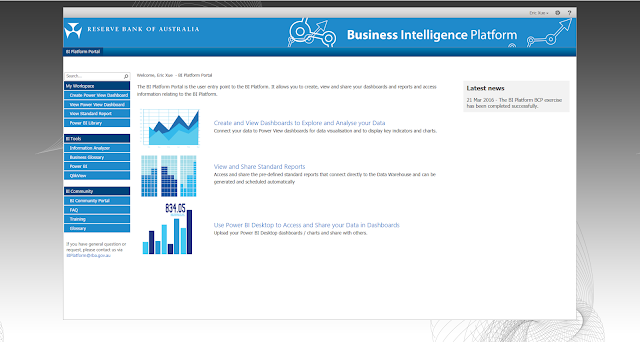
Most of the BI consultant don't know how to customize a out of box BI SharePoint portal, and I had been worked on the project to develop and implement a on premises Business Intelligence SharePoint 2013 Portal for Reserve Bank Of Australia. I would like to share my experience on the customization process in here. I created the site branding including HTML master page, custom jQuery and CSS.  The style references to an existing SharePoint 2010 site. The site uses the kerobers authentication for user logon and integrated with Reporting service, Power BI and Quick View application. I tested the site with Google WAG tool and fixed related WAG issues ( see my post ). I also fixed those security issues from the bank security testing result conducted by the bank.   Below are the screenshots of the portal. Portal home page Power BI Library See my posts related to this project:  Specific configuration to enable search Power BI files in SharePoint ...

SharePoint 2010 Branding upgrade to SharePoint 2013 project

Image
The DEECD (Department of Education & Earlier Childhood VIC) needs to upgrade the branding of several Public facing Sites from SP2010 to SP2013 platform.  I upgraded the existing look & feel in SP2010 to SP2013 and also made their mobile site using SP2013 new branding functionalities. I developed the customed HTML master page, CSS and jQuery file for below web sites. I also troubleshooting a "The Design Branding Package creation failure issue" which related to a SharePoint 2013 bug confirmed by Microsoft (see my post here ). Below are screenshots of some Web sites in desktop & its mobile site. The above content in mobile view won't be seen in the desktop view of the Website. It only shows when in the page editor mode. The Web site for Deaf user.

Upload “Power BI Files” only to “Power BI Library” in SharePoint site

Image
If you want to restrict to only upload Powe BI file (.pbix file) to “Power BI Library” as below screenshot, you can use following JQuery code in HTML masterpage. //Check upload file extension is PowerBI files - only for Power BI Library CheckAssetLibMediaExtension = function(){ if (window.parent.location.pathname.toLowerCase().indexOf('powerbifiles')>0) {       var allowedExtensions = /pbix/;       var inputFile = $("input[name$='InputFile']").val();       var ext = inputFile.substr(inputFile.lastIndexOf('.') + 1);      console.log(ext);       //var      $currentIFrame = $('.ms-dlgFrame');     if (!allowedExtensions.test(ext)) {           $("input[name$='btnOK']").attr('disabled','disabled');            alert('Only Power BI file with file extension name is .pbix can be uploaded       ...

Enable the Microsoft Power BI report file type (.pbix) in SharePoint Search

Image
By default, the Microsoft Power BI report file (.pbix) is not in the list of file type in SharePoint 2013 search configuration in Central Admin, and so you wouldn't open the Power BI file directly by clicking the link from the search result page. However, it's easy to add this file type by following configuration. Open “Central Admin” site, and then go to "Manage service applications”->”Search Service Application XX” (use the actual name of the “Search Service Application” in your site). Click on the “File Type” in left side navigation. Click the New File Type button and type PBIX (no period needed) in the File extension box and click OK. Restart the Search Service: Go to local “services”, stop the SharePoint Server Search service and start it again. Reset Your Index: Back on the Search Administration page within Central Administration you will want to click on the Index Reset link under Crawling on the left side menu. Press the Reset Now button. Rem...

The Design Branding Package creation failure issue related to a SharePoint 2013 bug

Image
I had been worked on a SharePoint 2010 Internet sites upgraded to SharePoint 2013 project in 2014. The SharePoint 2010 site was customized with some farm solutions.  I experienced the Design Manager Design Package creation failure issue in SharePoint 2013 which upgraded from SharePoint 2010. The Design Package was used for the site branding deployment. I added the branding sources files including JavaScript, HTML master page, CSS and images to another clean out of box site collection and then the design package can be created successfully on there. But after deployed those custom farm solutions to this site collection, and package creation was failure again.    So I started to look at this issue around those custom solution. I found out the root cause of the design package creation failure was the special character (ASCII) ▲ added to the custom property bag value. I went to SharePoint designer and then clicked on “Site Options”, and then removed a...

Mandatory Windows Services for Successful Kerberos Authentication in SharePoint 2013

Image
Recently I experienced the "Secure Store Service Application" and "Reporting Service Application" access denied error. I verify that both of the "Claims to Windows NT Token Service" in SharePoint Central Admin and Window System "Services"are unable to start. I fixed these issue based on my last post , but I still experienced the same access denied issue, and I also found out the Event id 8306 in Event Viewer for this error, I did a research in google and found out following windows services must be started in the server: Claims to Windows Token Service, Net.Pipe Listener and Net.Tcp Listener. Once I start these services, I can open the "Secure Store Service Application" and "Reporting Service Application" in Central Admin successfully.

Share one content database and site collection between two separate farms (failover farm)

I had been worked on a Business Intelligence platform project (SharePoint 2013 integrated with MS Reporting service). The working environment has two separate SharePoint farms as fail-over farms and they shared with one common content database (in a windows cluster across two servers and using SQL always on for high availability) and site collection. These two farms have their own configuration database and service application. I created one site collection in primary farm's server and add the same content database in another farm's server via Central Admin UI, However, the site collection created in primary farm server were not showing in the second farm's server, and so I try to use powershell to connect the content database again as below: //Find out the content database ID Get-SPContentDatabase -WebApplication <Web Application URL> //Disconnect from the current content database Dismount-SPContentDatabase <identify> (Note: the id was from last comm...

"Hack" SharePoint configuration database - Manually point to another configuration and content database SQL server in farm servers

Recently I was been told that SharePoint configuration and content database had been migrated and restored to another SQL server. I ran the SharePoint Production and Configuration Wizard to connect to the existing farm with the new SQL Serve Instance and same configuration database name. Once the wizard finished the process and the Central Admin site was ready, I went to the "Systems" page to check farm severs and saw the farm configuration database still showing the old SQL server instance. As the Project Manager won't  create a new farm and then reconfigure the SharePoint again, I have to come out another solution. Below is my idea to "hack"  the SharePoint configuration database although MS not recommend this way. :) I executed below SQL script against the [Objects]  table and found out the old SQL server instance record is there. SELECT TOP 1000 [Id], [ClassId], [ParentId], [Name], [Status], [Version], [Properties] FROM [SharePoint_Config].[dbo].[Objec...

"Unable to start Claims to Windows NT Token Service (c2WTS)" (Share Point Kerberos Authentication)

Recently I found both of the "Claims to Windows NT Token Service" in SharePoint Central Admin and Window System "Services"are unable to start. These services are for Kerberos Authentication. The error message is "Error 2:  Unable to find the specified file". I verify the "Path to executable" of the service's properties and found out it points to wrong path "C:\ProgramFiles\...". Although I am not sure who and how did this change, I run the command line " sc config <service name> binPath= <binary path> " as Administrator, and then the executable path was changed and I can start the service!!!. This post is part of my project  "Implement the Business Intelligence On Premises SharePoint 2013 Portal ". If you want to know more my experiences from the guide of above project, please sign up in  here .

SharePoint 2013 Troubleshooting - "Unable to create the folder in SharePoint Document Library"

Image
Recently I received the error message “Unable to create the folder in SharePoint Portal” when try to create a folder in document library in a SharePoint 2013 site which setup by others. I found out below error message in “Windows Application Log” Event viewer when every time fails to create a folder: WebHost failed to process a request. Sender Information: System.ServiceModel.ServiceHostingEnvironment+HostingManager/62723292 Exception: System.ServiceModel.ServiceActivationException: The service '/_vti_bin/client.svc' cannot be activated due to an exception during compilation. The exception message is: A binding instance has already been associated to listen URI 'http://xxxxx/_vti_bin/client.svc'. If two endpoints want to share the same ListenUri, they must also share the same binding object instance. The two conflicting endpoints were either specified in AddServiceEndpoint() calls, in a config file, or a combination of AddServiceEndpoint() and config. . ---> S...

Using IIS 7 URL rewrite rules to block the public "access" to SharePoint "_layouts" pages

When you use MS SharePoint 2007 / 2010 site as a Internet public facing site, it's smart and safe to block the anonymous access to back-end "_layouts" pages. It's easy to use IIS 7 URL rewrite rules to perform the access blocking. Below is the sample rule.      <rule name="_layouts" stopProcessing="true">           <match url="^_layouts($|/.*)" />           <conditions logicalGrouping="MatchAny">                <add input="{HTTP_HOST}" pattern="^pub\.stag\.moevenpick-icecream\.com$" />                <add input="{HTTP_HOST}" pattern="^pub\.prod\.moevenpick-icecream\.com$" />                 <add input="{HTTP_HOST}" pattern="^www\.moevenpick...